> For the complete documentation index, see [llms.txt](https://apidocs.arionbanki.is/llms.txt). Markdown versions of documentation pages are available by appending `.md` to page URLs; this page is available as [Markdown](https://apidocs.arionbanki.is/b2b-2013-schema/b2b-services/b2b-payment-service/relationship-with-online-bank.md).
# Relationship with online bank
### Batch processing
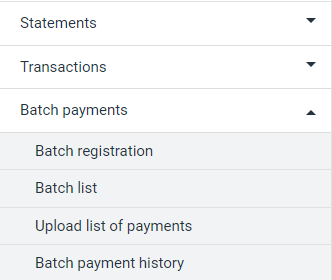
Figure 1: Location of Batch list on sitemap
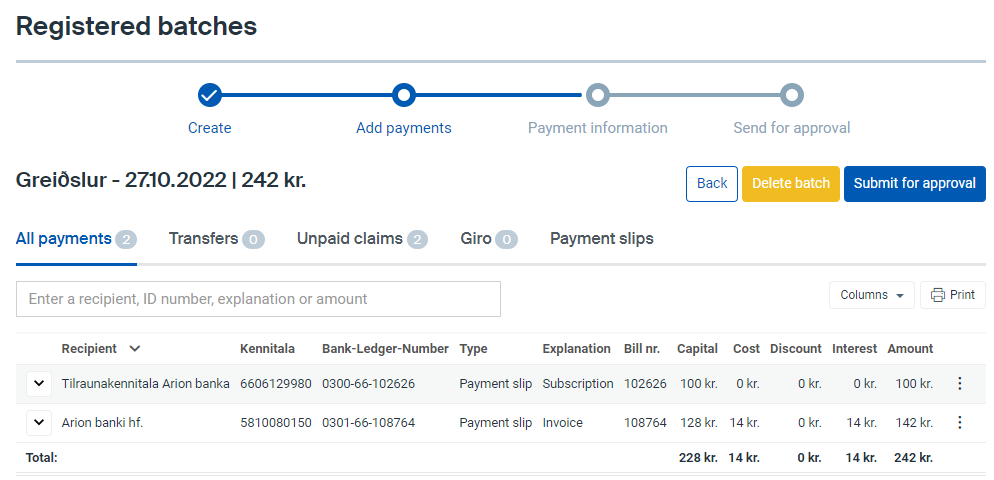
The B2B payment webservice allows companies to create payments from their own accounting system. They can be credit transfers or claim payments, with both single payments and batch payments available. There are two ways to confirm the payments: either with the straight through process, where payments are confirmed automatically without using the online bank; or they can be sent to the online bank where they await confirmation. In the latter case, users can access their batch payments on the “Batch list” page, which is accessible from the sitemap on the online bank. From there, it is possible to view, delete, or confirm the batch payments. Note that it is not possible to edit the batch in the online bank, as that would create a discrepancy between the account system and the online bank. It is possible to confirm batches that contain one or more payments with an error. In that case however, only the payments without an error will be confirmed. When this occurs, the user will need to delete the batch in the online bank, solve the errors in their account system, and create a new batch with the resolved error payments.
Figure 2: Registered batches (Batch list) in the online bank
### Initiating payments without using the online bank to confirm payments
Companies can request authorization for some employees to be able to confirm payments straight from their account systems, without needing confirmation in the online bank. This functionality is called straight through processing (STP) and is defined on a user level. If companies would like to incorporate this functionality, their power of attorney holder needs to contact Arion’s corporate services and request to have this functionality configured.
### Future payments and future batch payments
Users can create future payments and future batch payments through the B2B payments service. By fetching information on a batch via the *GetPaymentResults* (6.1) function, users can see the future payment date of the batch. It is also possible to see the future payment date of a batch in the online bank interface in the list of registered batches (see Figure 3):

It is also possible to see the date of a future single payment by navigating to the Transactions/Forward payments page on the sidebar (see Figure 4). Note that it is not possible to edit a future payment in the online bank, as that would create a discrepancy between the online bank and the accounting system. To change the due date, a user must delete the payment from the online bank and create it again with a new due date.

### Approval process
If a user that creates a batch payment that is configured to use the approval process, the batch will follow the approval process flow. There are two types of users in the approval process, defined as A-users and B-users:
A – User:
* Can create payments.
* Can pay approved payments from B users.
* Cannot approve payments from other users (A or B).
* Can pay payments that they have made themselves if a B user has approved it.
B – User (has more rights):
* Can create payments.
* Can approve payments from other users (A or B).
* Cannot approve payments that they have made themselves (B) but can approve payments from another B user.
* Can pay payments that they have made themselves (B) if another B user has approved.
* Can pay approved payments from A users.
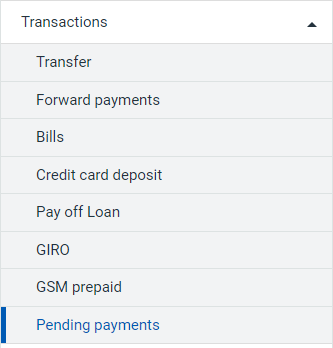
It is possible to view all pending payments in the online bank by navigating to the Transactions/Pending payments page (see Figure 5).
Figure 5: Pending payments can be viewed in the online bank